

A reproducible Ferryman example: retry only the failed destination
We exercised Ferryman's actual Create UI in an isolated local fixture on October 17, 2026. The example selected X and Bluesky, then supplied simulated publishing responses: X succeeded and Bluesky failed. The interface showed 'Some posts failed' with 'Retry failed (1).' Clicking that button produced a second request whose destination list contained only BLUESKY. The successful X destination was not included in that retry request.
This is a local demonstration with intercepted API responses, not a live outage, customer incident, or proof that a remote platform accepted a post. It verifies the UI's failed-only retry selection. The error used for the simulation described temporary destination unavailability. In real use, read the actual error first: an expired credential needs reconnection, an invalid file needs correction, and an unresolved processing task needs reconciliation before another submission.
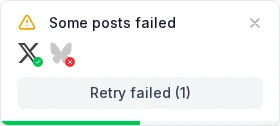
| Step in the local demonstration | Observed result | What it establishes |
|---|---|---|
| Initial direct-post request | X and Bluesky selected | Two intended destinations |
| Simulated responses | X success; Bluesky failure | Mixed-result UI and one retryable destination |
| Click Retry failed (1) | Second request selected BLUESKY only | The retry did not include the successful X copy |
Reconcile the destinations before pressing retry
A multi-platform action can produce several independent outcomes. One network may accept the post while another rejects the file or waits for processing. Start a short ledger with the destination account, tool status, actual post URL if present, exact error, and next action. Check the account you intended to use, not just the network's general feed or a notification screen.
For an illustrative three-destination release, account A has a visible post, account B shows a rejected file, and account C has an upload job still processing. Preserve A. Investigate B's file requirement. Continue checking C's existing job rather than sending another copy. These are example decisions, not measured outcomes from a Ferryman incident. The important distinction is between failure and uncertainty.
| Observed result | Next action | Avoid |
|---|---|---|
| Correct post is public | Save URL and leave it intact | Replaying the successful copy |
| Terminal failure with a cause | Fix the cause, then target that destination | Retrying unchanged invalid input |
| Processing or unknown | Inspect existing job and destination | Assuming silence means failure |
| Native review required | Complete the native step | Sending another draft as a fix |
Match the remedy to the actual error
Read the error before choosing a remedy. Expired authorization, missing permissions, unsupported media, a temporary transport issue, and content moderation are different problems. Reconnecting an account does not change an invalid video, and re-encoding a file does not grant a missing permission. Preserve the exact message and timestamp so support can connect your report to the correct operation.
TikTok's transfer documentation illustrates why broad retry advice is unreliable. A 206 upload response means more chunks remain; a 201 means the bytes arrived and posting can begin. A 403 can identify an expired upload URL, while a 416 points to an incorrect byte range. Those require different actions by the publishing software. A creator should report the error rather than repeatedly replacing a healthy account connection.
Keep the retry as narrow as possible
In Ferryman's direct Create workflow, the demonstrated 'Retry failed' control targets retryable failed destinations. Confirm the error is resolved and the original operation has a known outcome before using it. This example does not establish identical controls in every automatic-sync or scheduled-post screen. If your workflow lacks a targeted retry, create a replacement only for the confirmed failed destination and keep it linked to your internal campaign record.
The replacement may need different copy or media to meet the failed destination's requirements. Save both the original and corrected asset so you can explain the change. Check whether a source-sync rule could distribute a manually recreated native post again. A manual recovery can accidentally become a new source event, producing duplicates on accounts that were already successful.
Verify recovery and send a useful support report
After recovery, inspect the actual destination post, not only the tool's success message. Compare copy, media, link, and visibility with the intended version. Record the new URL and mark the failed row resolved. If the original status remains ambiguous, stop additional submissions and ask support to reconcile the existing job. A short pause is preferable to a growing set of indistinguishable copies.
Send support the tool's post or job identifier, platform, account identifier, timestamp with timezone, exact error, and a description of the expected result. Include a harmless sample file only when appropriate and keep credentials out of the report. In Ferryman, inspect the result of the workflow you used rather than assuming create, schedule, and source sync expose identical recovery controls. The ledger remains useful whichever interface performs the retry.
FROM GUIDE TO WORKFLOW
Explore this workflow in Ferryman
Review multi-platform publishing outcomes
See how Ferryman groups selected destinations into a publishing run and surfaces results that need attention. Confirm each destination's outcome before retrying.
Sources & further reading
Written by Ferryman. Sources checked Oct 17, 2026. Platform rules can change; consult the linked documentation for current requirements.